Recurring events in WordPress, free.
On The Events Calendar, recurring events come with the Pro plan, $399 a year (Liquid Web’s plan page, checked 25 October 2026). In Calendar², repeating events are part of the free plugin: daily, weekly on the days you choose, monthly or yearly, every so many days, weeks, months or years, ending never, after a number of times or on a date, and you can skip single dates. Here’s exactly what it does, and what it doesn’t do yet.
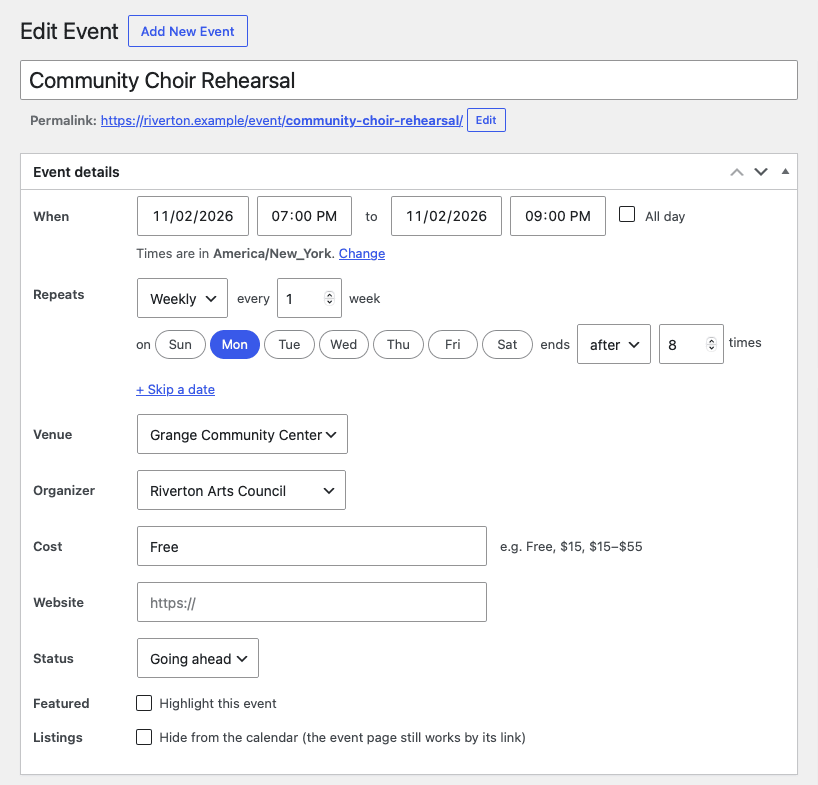
Every event has a Repeats row under its start and end. You build the rule from a few choices that read left to right, and Calendar² writes it back in words, such as “Every week on Tuesday and Thursday, 10 times”.
- Daily, weekly, monthly or yearly.
- Every N: every 2 weeks, every 3 months and so on.
- Weekly on the days you tick. Tick none and it repeats on the start date’s weekday.
- Monthly on the same day of the month (“on day 14”) or the same weekday (“on the third Saturday”), taken from the start date. A start on the 29th, 30th or 31st gives “the last Saturday”.
- Yearly on the start date’s day and month.
- Ends never, after a number of times, or on a date (that date included).
- Skip single dates, such as a bank holiday, with “+ Skip a date”.
Rules from elsewhere
Calendar² also stores and shows a few rules the editor doesn’t offer, when they arrive from an iCal feed in Calendar² Pro: the last day of every month, more than one weekday a month (“the first and third Tuesday”), and a fixed day each year. The editor shows such a rule as written and lets you replace it with a new choice.
- Days a month doesn’t have are skipped, not moved. Monthly on the 31st skips 30-day months and February, a fifth Friday skips months with four, and 29 February repeats in leap years only.
- The time stays put across clock changes: a 9:00 event is at 9:00 local time in March and in November, and a Friday-to-Sunday event stays Friday to Sunday.
- Each event can have its own time zone, and its repeats follow it.
- The start date is always the first date, even if it doesn’t match the rule.
- A skipped date still counts towards “after N times”, so 10 times with one date skipped gives 9 dates.
- If a rule can’t be used, the event shows once, on its start date, and the editor tells you why.
The Events Calendar’s Pro plugin does more here, and we’d rather you knew before you choose. Its documentation (updated 2 July 2026, checked 25 October 2026) describes extra dates outside a pattern, an exclusion based on a pattern as well as single dates, and editing one date of a series on its own. In Calendar² 1.1.0:
- There are no extra one-off dates on top of a rule. If an imported event lists them, they’re skipped and the import says so.
- You can’t edit one date on its own. For now, skip that date and add it as a separate event.
- Exclusions are single dates only, not a pattern.
- Yearly repeats fall on a date, not a weekday, so “the fourth Thursday of November” can’t be set.
- Nothing repeats more often than daily.
- There’s no Series that groups separate events. A repeating event is one post with all its dates.
If your site already uses Events Calendar Pro’s recurring events, the switch from The Events Calendar stops at the dry run before anything changes. We’ll lift that when we can carry those series across properly.
- Every date appears in the month, list and day views at /events/, and repeating events are labelled in the list.
- In lists, one setting (Repeating events, under Calendar²’s display settings) shows each repeating event once, at its next date, with “+N more dates”.
- The shortcodes follow it:
[calendar2 view="list" condense="yes"]turns it on for one page. Every attribute is in the shortcode reference. - The iCal feed sends the rule and the skipped dates, so a calendar app that subscribes repeats the event itself.
- The event’s own page and the admin events list show its repeat rule in words.
When you save a repeating event, Calendar² works out its dates once and writes each one as a row in a small indexed table. A calendar page then reads the rows for the period it shows, rather than working out every rule on every page view.
- Dates are planned 24 months ahead by default. You can set 1 to 120 months (Plan repeats ahead, in the settings), and a daily task extends the plan as time passes.
- For a series that’s still running, rows start 12 months back. A series that has ended keeps all its dates.
- Each series is capped at 3,660 rows, ten years of a daily event.
What we measured
In our performance review of a pre-release build on 17 October 2026, the test site had about 8,000 events, including daily and weekly series, which made about 99,800 date rows. The month page ran 29 database queries, 15 of them Calendar²’s, and took 105 ms on the server; the list page took 30 ms. That was with no persistent object cache and debug scripts on. Current figures are on the performance page.
- Calendar² 1.1.0: the repeat options, edge cases, limits and storage above are read from the plugin’s code, 25 October 2026.
- Our performance review, 17 October 2026: a pre-release build, about 8,000 events and 99,800 date rows, block theme, no persistent object cache, SCRIPT_DEBUG on. Server-side figures, last of seven warm runs.
- The Events Calendar plans: Liquid Web, checked 25 October 2026.
- Events Calendar Pro’s recurring events: recurring events documentation, updated 2 July 2026, checked 25 October 2026.
A repeat pattern we don’t cover?
Tell us the pattern and how many events use it. A person replies, usually within two UK working days.